

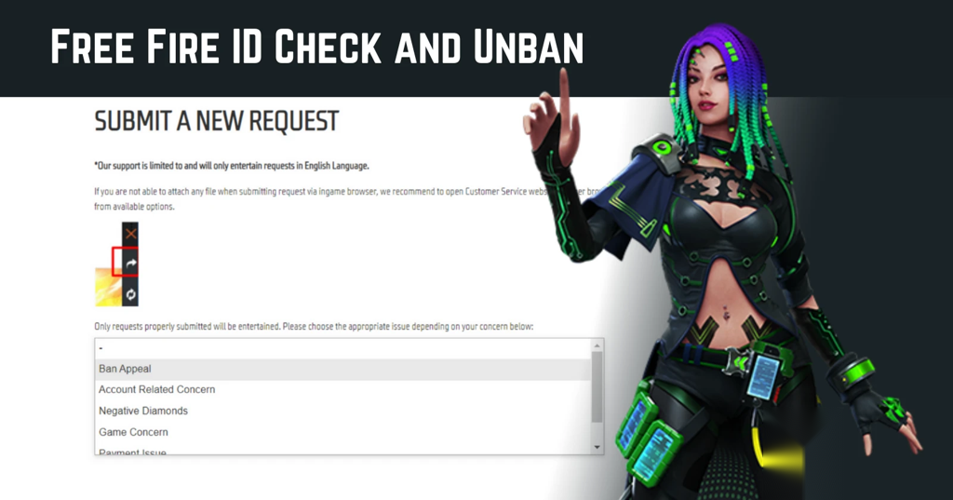
Account Ban Verification and Appeal
Many Free Fire players occasionally find their accounts banned without clear reasons. Some are unsure why their Free Fire ID was suspended, while others simply want to confirm whether their account is currently banned. Typically, accounts are banned when players are caught using cheats, hacks, or unauthorized third-party software that gives them an unfair advantage.
If you believe your account was mistakenly banned, there is a way to verify its status and potentially request an unban. Free Fire offers an official online tool designed to help players check if their ID has been flagged for suspicious activity.
Here’s how you can verify your Free Fire ID status and submit an appeal if necessary:
Step 1: Head over to the official Free Fire website.
Step 2: Locate the Free Fire ID status checker tool.
Step 3: Enter your Free Fire ID or linked account details into the provided field.
Step 4: Review the results to see if your account is marked as banned.
If the tool confirms your ID is banned and you believe this happened in error, you can proceed to file an unban appeal. This process typically involves filling out a form where you provide details such as your Free Fire ID, the reason you think the ban was incorrect, and any supporting information.
Taking these steps allows you to communicate directly with Free Fire’s support team, who will review your case and decide whether to lift the ban.
By following this simple procedure, players can stay informed about their account status and take appropriate action if they want to contest a ban.
To verify your Free Fire account status, start by visiting the official support page at ff.garena.com/en/support.
Once there, locate the search field designed for entering your Free Fire UID (User Identification Number).
Type your UID into the box and press the search icon to proceed.
After submitting your UID, the site will display a message directly beneath the search area.
If your account has been banned, you will see a notification indicating that the account was penalized for using unauthorized software, including details such as the month and year of the ban.
If no ban notice appears, your account is currently in good standing.
Additionally, the support page offers helpful videos and articles outlining the game's rules and policies, which can provide further clarity on Free Fire's regulations.
In cases where you believe your ban was unwarranted and you have not engaged in any cheating or hacking, you may file an appeal to lift the ban through the official support portal.
To begin the appeal process, simply return to the official Free Fire support website and follow the instructions provided for submitting an unban request.
Unban Request Guide
Visit ffxsupport.garena.com first.
Look for the yellow sign-in button located at the top-right corner and click it.
If your Free Fire account is connected to Facebook, select the Facebook login option and enter your main Free Fire credentials.
After logging in, your profile will be automatically set up on the site.
Next, proceed to manage your profile and explore the available request options.
Once you have logged in, your in-game username will be visible on your profile page.
Navigate to your profile, where you will find three choices: My Requests, Submit a Request, and Sign Out.
Select the Submit a Request option to proceed.
Next, complete the unban appeal form by providing the required details.
Access the unban appeal portal to begin the process.
You must carefully complete the provided form with accurate information.
Start by entering your active and valid email address.
Next, input your unique Free Fire UID and your current in-game nickname.
If your account displays a ban notification, include a clear screenshot of that message.
In the description field, provide a thorough explanation of your situation.
Clearly state that you have not utilized any unauthorized software, hacks, or cheating tools.
Finally, ensure you read and acknowledge the terms by checking the policy agreement box before submission.
Appeal and Account Security
After submitting your appeal, patiently await the official review.
Garena's support team will assess your case thoroughly.
Accounts penalized in error may see restrictions lifted within several days.
However, any verification of unauthorized third-party software or cheating will result in a permanent ban.
Appeals are only successful for accounts wrongfully sanctioned; confirmed violations are irreversible.
To protect your account, strictly avoid unverified tools or sites promising quick fixes.
Always utilize the official Free Fire website and support for any account issues.
Adhering to the game's terms of service is the best way to maintain account security.
This guide outlines the legitimate process for status checks and appeals.
Rely solely on official channels to ensure your account's safety.
We trust this guidance assists you in navigating the official procedures.
For further helpful updates, continue to follow our resources.
Free Fire Diamond: Usage and Acquisition
Free Fire Diamond is the premium currency within the Free Fire game, enabling players to unlock special skins, outfits, weapon upgrades, and other unique features that enhance their gaming experience.
To obtain Free Fire Diamond, gamers often use top up services on platforms like Codashop, Google Play, or the in-game store, where they can purchase diamonds directly and safely.
This currency is essential for accessing exclusive content and participating in limited-time events, making it highly sought after among Free Fire enthusiasts.
Free Fire top up on LootBar
If players are looking to top up Free Fire Diamond, they might want to consider using the lootbar game trading platform. This platform is designed specifically to offer a seamless and efficient service for gamers seeking to enhance their Free Fire experience.
The lootbar trading platform stands out by providing a professional and secure environment for all transactions, including Free Fire top up. Players can benefit from significant savings, as the platform frequently offers free fire diamonds cheap through various discounts and promotions. With the convenience of multiple payment options and around-the-clock customer support, purchasing free fire diamonds becomes a hassle-free process.
Moreover, by choosing lootbar.gg, players gain access to a global service that prioritizes safety and reliability. This ensures that every purchase of Free Fire Diamond is not only economical but also secure, allowing gamers to focus on enjoying their game without concerns.
How to top up Free Fire on LootBar
To top up Free Fire Diamond using the lootbar trading platform, start by visiting the official LootBar website and selecting your preferred language and currency. Log into your account and navigate to the free fire top up centre, where you will find a list of games available for top-up services. Select Free Fire from the options, ensuring that you are choosing the correct game for diamond purchases.
Next, decide how many Free Fire Diamonds you wish to acquire and proceed by clicking the "Top-up Now" button. You will need to enter your Free Fire UID to ensure the diamonds are credited to your account. Once you’ve filled in the necessary information, select your preferred payment method and complete the transaction. After payment, the diamonds will be delivered to your Free Fire account, allowing you to enjoy premium in-game content.
What is the best Gaming Top-Up Platform?
As a trusted choice for gaming top-up, LootBar offers both top speed and affordability. The platform has earned a reputation as the best platform for gaming recharge, supported by outstanding customer feedback—4.9/5.0 on Trustpilot.

 English
 Arabic
 French
 Spanish
 Deutsch
 Turkish
 Dutch
Dutch
 Italiano
 Russian
 Romaian
 Portuguese (Brazil)
 Greek
Greek